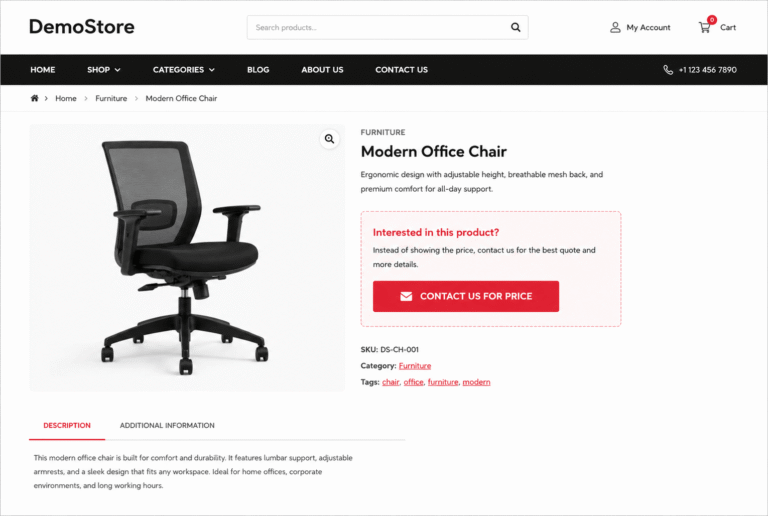
Some WooCommerce stores sell products that require custom quotations, wholesale inquiries, personalized pricing, or direct customer communication before purchase. In these situations, displaying a fixed product price may not always be the best approach.
Instead of showing the regular WooCommerce price and Add to Cart button, many store owners prefer replacing them with a custom contact form or inquiry button. This allows customers to request pricing details, discuss customization options, or submit bulk order inquiries directly from the product page.
By default, WooCommerce does not provide a built-in option to replace product prices with a contact section dynamically. However, this behavior can easily be customized using a lightweight PHP snippet without installing additional plugins.
In this tutorial, you’ll learn how to replace WooCommerce product prices with a custom contact button using simple code.
What This WooCommerce Snippet Does
- Removes the default WooCommerce product price
- Hides the Add to Cart button
- Displays a custom contact button instead
- Works on single product pages
- Requires no external WooCommerce plugins
- Helps create quote-based or inquiry-based stores
WooCommerce PHP Snippet: Replace Price with Contact Button
The following snippet removes the product price and Add to Cart button from WooCommerce product pages and replaces them with a custom contact button.
<pre class="wp-block-code"><code lang="php">
/**
 * Replace WooCommerce Price with Contact Button
 */

add_action( 'wp', 'custom_hide_price_and_cart_button' );

function custom_hide_price_and_cart_button() {

    /*
     * Remove product price
     */

    remove_action(
        'woocommerce_single_product_summary',
        'woocommerce_template_single_price',
        10
    );

    /*
     * Remove add to cart button
     */

    remove_action(
        'woocommerce_single_product_summary',
        'woocommerce_template_single_add_to_cart',
        30
    );

    /*
     * Add custom contact button
     */

    add_action(
        'woocommerce_single_product_summary',
        'custom_add_contact_button',
        30
    );
}

function custom_add_contact_button() {

    echo '<a href="/contact/" class="button alt">Contact Us for Pricing</a>';
}
</code></pre>
How This WooCommerce Snippet Works
The snippet hooks into the WooCommerce single product page layout and removes two default WooCommerce elements:
- The product price
- The Add to Cart button
After removing those elements, the code inserts a custom contact button in the same location. When customers click the button, they are redirected to your contact page where they can request pricing details or submit product inquiries.
This approach is commonly used for wholesale products, custom-made items, B2B stores, luxury products, and quotation-based WooCommerce websites.
Can You Show the Contact Button Only for Specific Products?
Yes. You can easily modify the snippet to target only selected WooCommerce products or categories by adding conditional logic inside the function.
This gives you full control over which products should hide pricing and which products should continue using the default WooCommerce checkout system.
Where Should You Add This Code?
Add the PHP snippet to your child theme’s functions.php file or use a dedicated WordPress code snippets plugin.
Before applying changes on a live WooCommerce store, test the functionality on a staging website to avoid conflicts with custom themes or third-party WooCommerce extensions.
Explore More Blogs :
WooCommerce Auto Select Cheapest Shipping Method