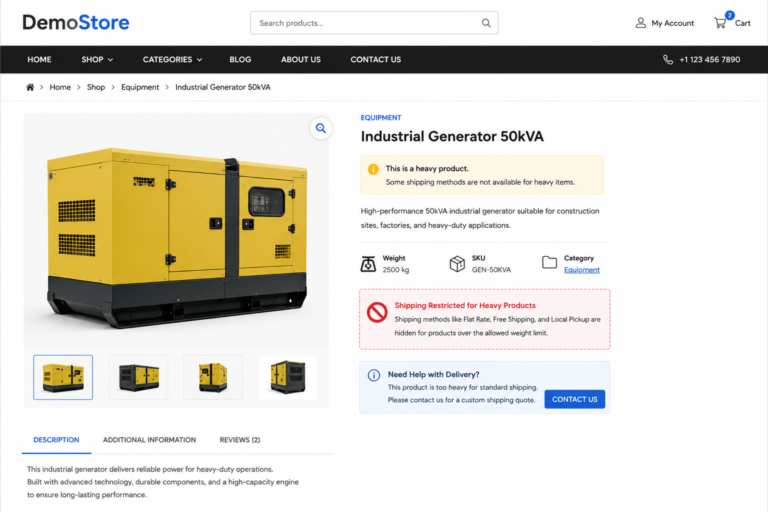
Shipping restrictions are often necessary in WooCommerce stores that sell oversized, bulky, or heavyweight products. Certain shipping methods may not support high-weight items, while some delivery services become too expensive or unavailable once the cart exceeds a specific weight limit.
In these situations, many store owners choose to hide shipping methods for heavy products automatically instead of allowing customers to select invalid delivery options during checkout.
By default, WooCommerce allows all enabled shipping methods to appear if they match the shipping zone configuration. However, WooCommerce does not provide built-in conditional shipping logic based on cart weight without additional extensions.
Fortunately, you can easily customize this behavior using lightweight PHP snippets without installing extra WooCommerce plugins.
In this tutorial, you’ll learn how to hide WooCommerce shipping methods for heavy products dynamically using custom code.
What This WooCommerce Snippet Does
- Detects total WooCommerce cart weight automatically
- Hides selected shipping methods for heavy products
- Supports Flat Rate, Free Shipping, and Local Pickup
- Works dynamically during checkout updates
- Improves checkout accuracy for oversized products
- Requires no external shipping plugins
WooCommerce PHP Snippet: Hide Shipping Methods for Heavy Products
The following WooCommerce snippet checks the total cart weight and hides selected shipping methods if the weight exceeds your custom limit.
<pre class="wp-block-code"><code lang="php">
/**
 * Hide Shipping Methods for Heavy Products
 */

add_filter( 'woocommerce_package_rates', 'custom_hide_shipping_for_heavy_products', 100, 2 );

function custom_hide_shipping_for_heavy_products( $rates, $package ) {

    /*
     * Set maximum allowed cart weight
     */

    $weight_limit = 20;

    /*
     * Get WooCommerce cart total weight
     */

    $cart_weight = WC()->cart->get_cart_contents_weight();

    /*
     * Check if cart exceeds weight limit
     */

    if ( $cart_weight > $weight_limit ) {

        foreach ( $rates as $rate_id => $rate ) {

            /*
             * Hide Flat Rate shipping
             */

            if ( 'flat_rate' === $rate->method_id ) {

                unset( $rates[ $rate_id ] );
            }
        }
    }

    return $rates;
}
</code></pre>
How This WooCommerce Shipping Snippet Works
The snippet hooks into WooCommerce shipping rate calculations using the woocommerce_package_rates filter.
Whenever WooCommerce loads shipping methods during checkout, the code calculates the total cart weight automatically using the WooCommerce cart object.
If the total weight exceeds your defined limit, WooCommerce removes specific shipping methods from the available shipping options dynamically.
In this example, Flat Rate shipping is hidden once the cart weight becomes greater than 20 units.
How to Hide Multiple Shipping Methods
You can also remove multiple WooCommerce shipping methods at the same time.
Example:
<pre class="wp-block-code"><code lang="php">
/*
 * Hide Multiple Shipping Methods
 */

$blocked_methods = array(
    'flat_rate',
    'free_shipping',
    'local_pickup'
);

foreach ( $rates as $rate_id => $rate ) {

    if ( in_array( $rate->method_id, $blocked_methods ) ) {

        unset( $rates[ $rate_id ] );
    }
}
</code></pre>
Advanced Technique: Hide Shipping by Product Weight Individually
Instead of checking total cart weight, you may want to detect whether a specific heavy product exists inside the cart.
The following WooCommerce technique scans all cart items individually.
<pre class="wp-block-code"><code lang="php">
/**
 * Detect Heavy Products Individually
 */

foreach ( WC()->cart->get_cart() as $cart_item ) {

    $product = $cart_item['data'];

    $product_weight = (float) $product->get_weight();

    if ( $product_weight >= 15 ) {

        /*
         * Custom heavy product logic
         */

        unset( $rates[ $rate_id ] );
    }
}
</code></pre>
Additional Customization Ideas
- Hide Free Shipping for oversized products
- Allow Local Pickup only for heavy items
- Restrict Express Shipping above weight limits
- Apply custom freight shipping dynamically
- Show custom notices for restricted shipping methods
- Combine shipping restrictions with product categories
Implementation Steps
- Open your WordPress dashboard
- Navigate to Appearance → Theme File Editor
- Open your child theme’s functions.php file
- Copy the WooCommerce shipping snippet
- Paste the code at the bottom of the file
- Save changes
- Test checkout using heavy products
- Verify shipping methods hide correctly
Where Should You Add This Code?
Add the PHP snippet inside your child theme’s functions.php file or use a safe code snippets plugin for WordPress.
Before deploying on a live WooCommerce store, test all shipping zones and checkout conditions carefully to avoid conflicts with third-party shipping extensions.
Explore More Blogs :
WooCommerce Replace Product Price with Contact Form